





Can't view this email properly? Click here for the online version

President’s Message

This Newsletter renews TEL’s efforts to help TEL Dealers make money and to help customers improve telecom operations! Our mission is to help TEL Dealers and customers make, save, manage and plan money involved in their telecom activities.

For nearly 30 years, TEL has done well in this, thanks to many good TEL Dealers and almost 50,000 customers. We assure you that we will continue to provide the best products, the best support and service, and the efforts from a company – TEL – with the best experience and largest installed base in our market! THANKS FOR YOUR BUSINESS!! .

John L. Gunter
President

Tech’s Corner

TEL wants to make sure that your experience with our products is the best that it can be and a few extra minutes talking to your sales person when ordering your customer’s new call accounting system can really help shorten the time it takes to install it in the field.

Please provide them with all the information they ask as this will help us customize the system here at the factory so that it is virtually Plug-n-Play at the customer’s site. This will save you time and money – time you can take to sell another TEL system!

Understanding Your Customer

Understanding who your customer is, how they think, and what they need will help your organization sell more products and services.

Sales organizations, call centers, law firms, government agencies, universities, hospitals, and hotels all have different needs and wants. If an organization can understand what these needs and wants are then they can create marketing materials that will highlight those things that are most important to their customers.

Below are a few questions you can ask to help better understand your customer:

• Who are your customers? Can you segment them?
• What products do your customers buy?
• Why do your customers buy what they buy?
• What are the product benefits that make them want to buy your product?
• When do your customers buy? Are they ready when you’re ready?
• How do your customers buy?
• Can you make the purchasing process easier?
• Where do your customers buy your products?

For more information visit TEL’s industry solution webpage or email info@tel-electronics.com.

Online Dealer Resources

Registered dealers now have many valuable sales and marketing materials available to them on TEL’s new website, www.tel-electronics.com. The new dealer login page gives dealers access to product brochures, internal documents, order forms, and online presentations. New announcements and product updates will be announced through the dealer home page, along with discounts and promotions.

Upcoming product forums will also be available to help resolve common technical support issues. Dealers will be able to post comments and makes suggestions for product improvement and development. Along with the many support resources available to dealers, TEL has built marketing and sales tools designed for the end-user. Quick Reference Cards, Calculators, and Custom Brochures will give dealers the ability to connect even more with their clients.

Through the dealer home page, dealers can now request customized brochures that target their specific clients’ industry and needs. Customized brochures include the needs. Customized brochures include the dealer’s logo, name, and contact information.

For example, say a telecom contractor in Oregon is working on a bid for the Wasatch Hospital and wants to put together a call accounting brochure that highlights the specific reasons why that hospital would need a call accounting system. On the dealer home page, this particular contractor can fill out a simple form, explaining who their customer is and what they want their brochure to look like. If requested before 3:00 pm, the contractor will receive an email that same day with a customized brochure designed specifically for the Wasatch Hospital.

TEL is committed to providing world-class service and support. Register your company today and gain access to the many resources and services mentioned in this article.

Importing Organization Lists into the WIN-SENSE 32

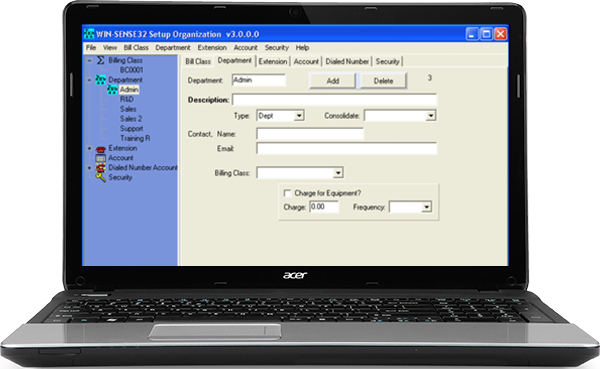
Technicians can now quickly import spreadsheets with billing class, department, extension, account, and phone number information into the Setup Organization module of the WIN-SENSE 32.

Version 2 of TEL’s WIN-SENSE 32 call accounting product gives telecom technicians the ability to import extension and department information directly from a spreadsheet.

Technicians will no longer need to enter extension information one-by-one, but can now use an automated program that will match fields from a spreadsheet or table imported from popular programs such as Microsoft Excel.

The easiest way to setup an organization is to create billing classes in the Setup Organization module and then import department, extension, and account lists from spreadsheets saved on the computer.
When creating a spreadsheet, be sure to save each spreadsheet as an individual file, such as “Accounts.csv” or “Extensions.csv”. Tables must be saved as “.csv” files before they can be imported into the WIN-SENSE 32 program.

TEL Quick Reference cards and templates found in the dealer resources section of www.tel-electronics.com can help technicians know which fields to use in their tables.

To import a spreadsheet, open the Setup Organization module and select File > Import > Department. Locate the file you want to import and click Open. The fields should automatically match, but if they don’t make sure the middle column and the right column match up. Click Begin Import to start importing.

*Summer discount not valid with other discounts. Shipping & handling not included. Offer good through September 30, 2008.


To unsubscribe to this newsletter, send a blank email to unsubscribe@tel-electronics.com

TEL electronics, inc.
705 East Main Street
American Fork, UT 84003
1-800-748-5022

www.tel-electronics.com