





tel electronics logo live demo Live Demo call accounting dealer Dealer Login call accounting price Pricing call accounting support Support request call accounting Request Info contact call accounting 800-748-5022

Call Accounting & Telecom Management Solutions

Call Accounting Software for Large Businesses

December 21, 2009

Introduction

Call accounting software is used businesses to capture, record, and cost telephone usage events.  Without call accounting software, businesses must manually collect call data and have few options when it comes to billing and charging for phone time.  As you’ll see in this article, businesses can use call accounting software for various purposes.  We’ll discuss some of these uses below.

The Need for a Call Accounting System

In order to understand the need for a call accounting system, let’s take a look at a fictitious example.  Let’s suppose that XYZ Corporation is located in Phoenix, AZ and has ten offices scattered across the Western United States.   Let’s also assume that the corporate office pays for all property expenses, utilities, salaries, and other expenses for each branch office.  At the end of each month, XYZ sends a detailed lump sum bill to each branch manager for these expenses.    

Fred Jones, the CEO of XYZ, wants to make sure that managers at all levels have the reports needed to make good decisions.  Some of these reports include information about telephone usage.  For example, the VP of Sales needs a monthly summary report showing him how many outgoing sales calls are being made at each location. He uses the information in this report to evaluate the performance of each branch sales manager and to forecast future sales revenues.   Branch sales managers need daily and weekly reports to identify how many calls are being made and received, the average length of each call, the geographic focus of each salesperson, and the average sale per call.

At a corporate level, the CFO needs to allocate telecom expenses by each branch office.  At a local level, the Branch Controller needs to allocate telecom expenses by the individual departments within the branch.  The Branch Controller must also ensure that clients are being properly billed for telephone consulting services provided by the company.  

The IT manager needs a monthly report showing him the trunk usage levels at each location in order to ensure that the company isn’t missing calls and/or paying too much for telephone lines.  The IT Manager also wants to make sure that the phone system isn’t being abused.  Toll fraud, employee phone abuse, and other potential security risks need to be monitored on a daily basis.
In addition to the reports listed above, XYZ needs to be able to create call reports on as needed basis.  Fred wants access to all of this information without spending a lot of money.

The Solution – Call Accounting Software

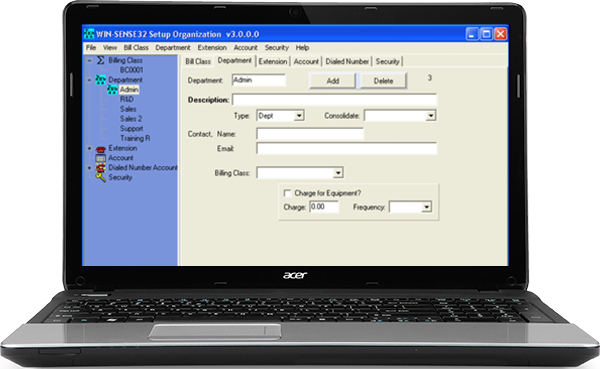
The good news for Fred is that he can run and schedule all of these reports without ever leaving his office.  Call accounting software, such as the WIN-SENSE 32, can provide the information and reports needed to help XYZ make the best possible business decisions as they relate to telephone performance and activity.

By installing call accounting software on the corporate network and then collecting call data from the ten branch offices, XYZ can track any call made from or received by any employee.  The VP of Sales can setup a report to summarize outbound call activity for each location and then have this report automatically emailed to him at the beginning of each month.  The Branch Sales Manager can help improve employee productivity by comparing each salesperson against the group.  He can look at key indicators such as the number of calls made, the average length of calls, and the average sales revenue per call.  Detail and Summary reports can be scheduled to run daily and weekly if needed.

Additionally, by easily setting up the organization structure of the company, the CFO can quickly allocate telecom expenses for each individual branch.  Department and Branch reports can be automatically emailed to each branch manager, making the process effortless.  The local Branch Controller can also easily allocate the expenses by department and/or employee.  Call accounting software also allows managers to set custom markups and surcharges to ensure that clients are properly being billed for phone time.  By associating each client phone number with an account code, not only will clients be billed correctly, but the company will make more money as a result.

And finally, the IT manager can use call accounting software to optimize his telephone network.  Trunk reports, exception reports, custom alarms, and real-time auditing will help him cut down on phone abuse and eliminate toll fraud.  Automatic monthly reports will sure make his job easier.   

Summary of Call Accounting Benefits

The following items are just a few of the many benefits provided by call accounting software.  Large organizations and businesses of all sizes can use call accounting software to improve employee productivity, charge for phone usage, and optimize telephone network performance.

  • Collect call data from single or multiple locations and/or PBXs;
  • Monitor employee phone activity;
  • Track incoming/outgoing phone calls;
  • Eliminate phone abuse and toll fraud;
  • Charge or bill clients for phone time;
  • Identify threatening or harassing callers;
  • Be alerted when emergency calls (911) are made;
  • Schedule daily, weekly, or monthly Reports;
  • Email different reports to different managers;
  • Allocate telecom expenses by department or division;
  • Monitor employee activity across multiple departments;
  • Establish internal controls to comply with government regulations.

Conclusion

As seen with the XYZ Corporation, call accounting software can be used for multiple purposes at multiple levels of an organization.  Specific and relevant reports can be scheduled to run on a daily, weekly, monthly, or during a customized time frame.    These detailed or summary reports can be automatically emailed to the managers who need the information at the exact time that they need the information.   Additionally, the WIN-SENSE 32 reporting module can be installed on managers’ computers for unlimited access to all reports and information.


Site Map | Contact | Customer Showcase | Dealer Opportunities | Dealer Login

Site Search Site Search